How campus carpooling works on Syinq
Campus carpooling on Syinq runs one trusted lifecycle: you find a ride or offer your own, match with verified students heading the same way on route and timing, board with OTP proof-of-pool, then ride with live status and settle your share, splitting the running cost, never paying a fare Syinq sets.
Four steps from search to settled
Every ride, whether you find one or host one, runs the same trusted lifecycle. Here's exactly what happens at each stage, and what you see in the app.
Find a Pool, or offer one
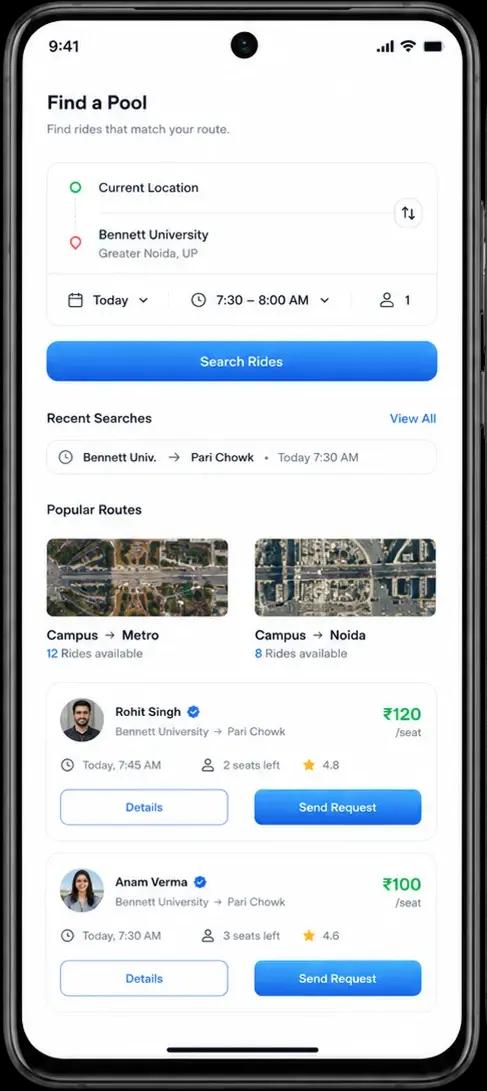
Enter where you're going. Riders see verified members heading the same way; Hosts publish spare seats on a route they're already driving. No match yet? Save it as Looking and we'll watch for one.
Open Syinq, set your campus and where you're headed, and the network does the sorting. Riders browse verified members already going the same way; Hosts publish the spare seats on a route they're driving anyway. Nothing matches today? Save it and Looking keeps the search alive for you.
- Riders search live routes and see only verified campus members
- Hosts list spare seats on a trip they already planned to take
- No match yet saves as Looking, so your demand is never lost
Match with people from your campus
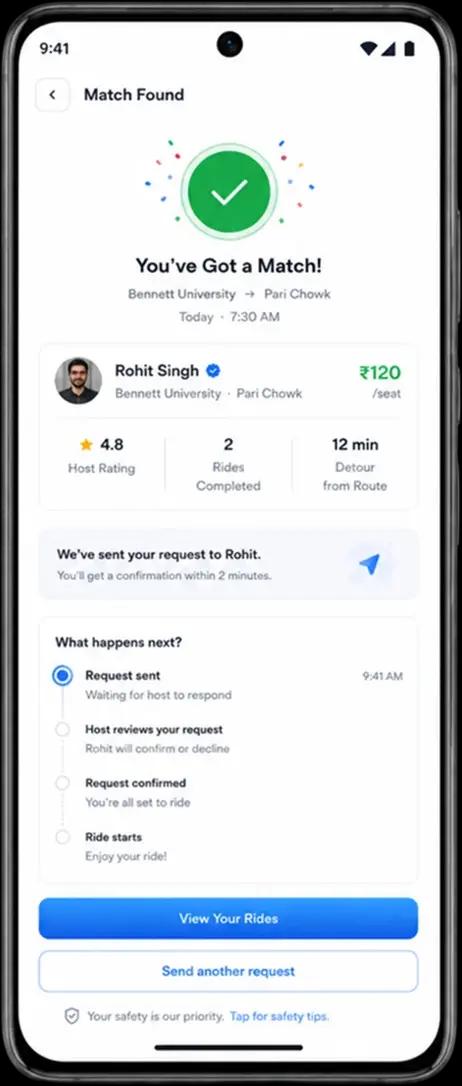
Syinq matches on route, timing and campus. Send a request, the Host accepts, and you agree a fair split of the running cost, your share, never a Syinq fare.
Syinq matches on the three things that actually matter, route, timing and shared campus, so you only see realistic pools. Send a request, the Host reviews and accepts, and together you agree a fair split of the running cost. That's your share, never a fare Syinq invents.
- Matching weighs route overlap, departure timing and your campus
- Verification badges and ratings show before you commit
- You and the Host agree your share of the running cost upfront
Board with OTP proof-of-pool
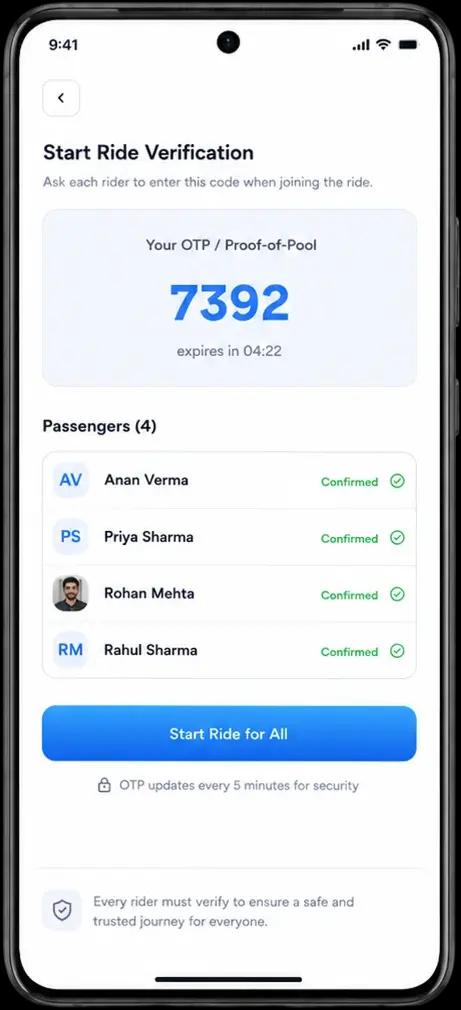
At pickup, the Host's one-time code is entered to confirm the right people are in the right ride. It's the proof that a shared ride really happened, the heart of campus trust.
At pickup, the Host's one-time code is entered in the app to confirm the right members climbed into the right ride. This is proof-of-pool, a verifiable record that a shared campus ride genuinely happened, and the accountability layer the whole network is built on.
- The Host shares a one-time code at the pickup point
- Entering it confirms the correct pool boarded the correct ride
- Each verified boarding becomes a trust record on both profiles
Ride with live status, then rate
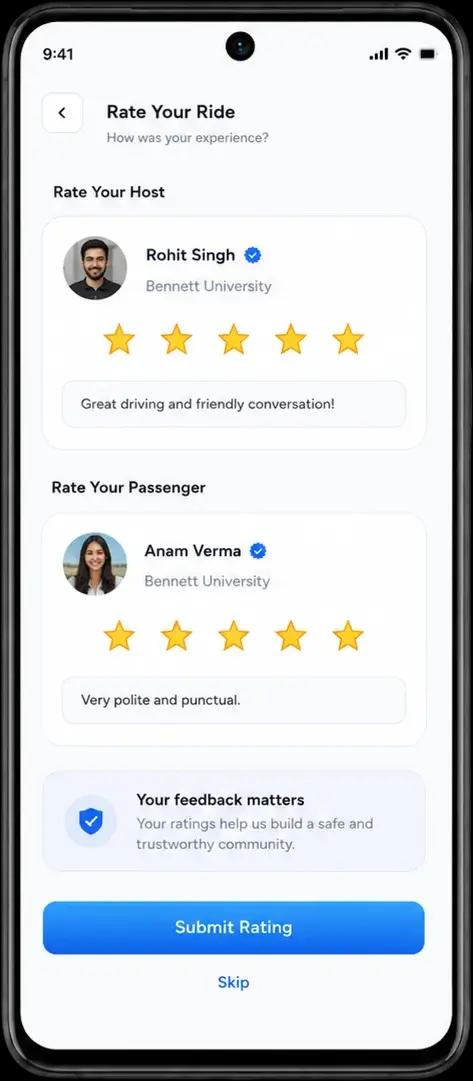
Follow live ride status with SOS readiness and shared trip location. When you arrive, settle your share directly and rate each other to build campus reputation.
Once you're moving, follow live ride status on the map, share your trip with trusted contacts, and keep SOS within reach if anything feels off. When you arrive, settle your share directly with your Host and rate each other so campus reputation keeps compounding.
- Live status, shared trip location and SOS readiness travel with you
- Settle your share directly with your Host when the ride ends
- Two-way ratings build a reputation that makes future pools easier
When there's no ride yet, Syinq remembers
When no ride matches yet, your search doesn't vanish, it becomes Looking, a saved record of where and when you need to go. Syinq keeps watching the network, and the moment a verified Host publishes a matching route, you're notified so demand turns into a real pool instead of a dead end.
- A failed search is captured as saved demand, not discarded
- Syinq watches the network for a Host on your route and timing
- You're notified the moment a matching pool becomes available
No match yet
Your search finds no live pool on the route today.
Saved as Looking
Syinq keeps the demand on its watchlist for you.
You're notified
A matching Host appears and you get the ping.
The full lifecycle, end to end
From the first search to the final rating, every state of a campus pool has a clear, accountable step in the app, nothing is left to a guess.
Looking
Demand is saved when no ride exists yet.
Match found
A verified Host on your route appears.
Request accepted
The Host confirms your seat and the split.
Host en route
Track the approach to your pickup point.
OTP verification
A one-time code confirms the right pool boards.
Ride in progress
Live status, shared trip and SOS stay on hand.
Completed
Arrival is logged with a clear ride summary.
Settle & rate
Settle your share, then rate each other.

Ready to run your first pool?
Find or offer a ride, board with proof-of-pool, and split the cost with verified students from your campus. Free on iOS and Android.